Orders get missed
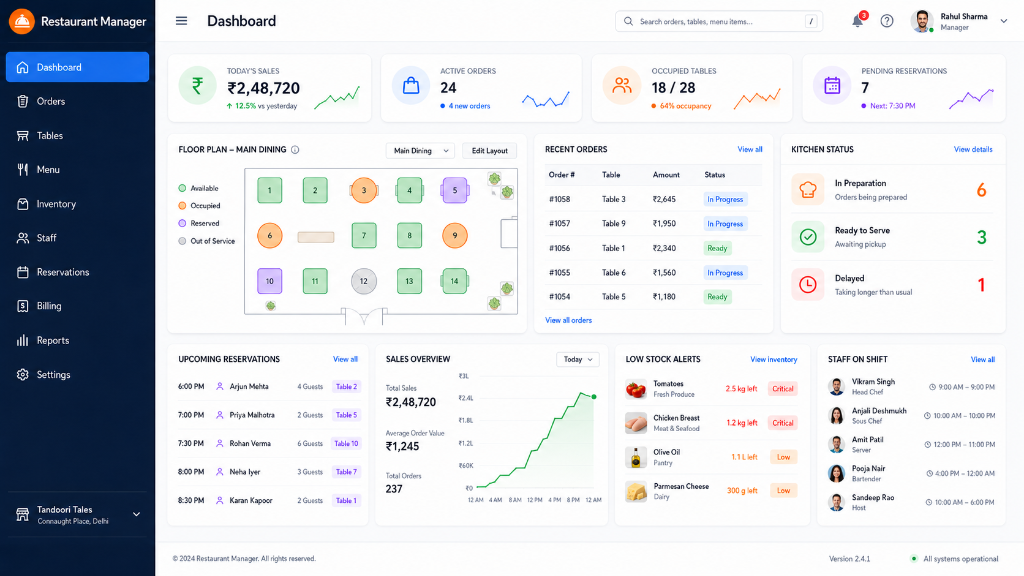
Track new, preparing, ready, delivered, and cancelled orders from a single live-updating operations screen instead of relying on memory or lost chits.
Table 4: 2x Pizza (Cooking)
Table 2: 1x Pasta (Ready)
Custom applications for everyday businesses
We listen to how your business works, find the slow parts, and build simple software that saves time, reduces mistakes, and keeps your team moving.
Problems we solve
Anchor turns repeated confusion into clear screens, useful alerts, and records your team can trust.
Track new, preparing, ready, delivered, and cancelled orders from a single live-updating operations screen instead of relying on memory or lost chits.
Know what is low, what was used, and what needs to be purchased before items run dry.
Manage rooms, tables, slots, or VIP bookings without writing over double-booked sheets.
Assign daily routines, see what is pending, and track delays without constant phone calls.
Keep customer requests, bookings, and VIP feedback safe in a simple digital log.
No more spending hours at the end of the month stitching together Excel cells. Turn daily entries into immediate summaries of revenue, stock wastage, and check-ins.
What we build
Start with one painful workflow, then grow the system as your team actually uses it.
No items added. Click menu items to mock an order.
💡 Click any room block to toggle status (Available ➔ Occupied ➔ Dirty).
Verify kitchen ingredient changes.
Check staff hours report.
Purchase low flour bags.
No tasks completed yet.
Click buttons below to append new inputs into your custom mobile form panel.
Click buttons on the left to start building.
Good first app ideas
These are practical first projects that local businesses understand quickly and can use without long training.
Customers scan, order, and staff track each table from kitchen to bill.
Low-stock alerts, supplier records, purchase history, and usage notes.
Live room status, guest requests, cleaning tasks, and checkout readiness.
Tables, rooms, service slots, deposits, reminders, and simple admin control.
Daily check-ins, task assignments, shift notes, and manager summaries.
Collect reviews, repeat-customer details, coupons, and complaint follow-ups.
Record expenses, daily cash, pending payments, and weekly business summaries.
Track supplier orders, delivery status, payment dues, and purchase approvals.
Project examples
These example scopes show the kind of work Anchor can build. As real client work is completed, this section can become a proper portfolio with screenshots, results, and testimonials.
A simple system where staff can create orders, kitchen users can update preparation status, and the counter can prepare bills from one shared view.
A live operations board for room status, guest requests, cleaning progress, check-ins, checkouts, and payment notes.
A focused office tool for assigning work, checking pending tasks, recording client follow-ups, and giving managers a quick daily summary.
Select the features you need below. The estimated days and cost will update dynamically.
💡 Est. split: 50% advance to start build, 50% on successful launch. We deliver code within the estimated timeline.
How it works
We sit down with you to understand your real daily floor work, pain points, and must-have reports.
You get a clear, plain-English feature breakdown, timeline, exact cost, and first-version scope details.
We create the application, provide weekly progress previews, and refine details based on real feedback.
After launching successfully, we manage databases, security updates, server hosting, and handle feature extensions.
Why Anchor
Anchor is built for business owners who need useful tools, not confusing technology. We begin by understanding your real daily work: who does what, where mistakes happen, and what information the owner needs at the end of the day.
The goal is not to build every possible feature. The goal is to launch a first version your staff can actually use, then improve it based on real feedback.
Trust builders
For a new business, trust comes from clarity. Anchor makes the work visible so clients know what they are paying for.
Features, pages, user roles, timeline, and pricing are written down before work starts.
Clients see the app while it is being built, so feedback comes early and clearly.
Important flows are checked before launch, including forms, reports, logins, and mobile views.
Staff get a practical walkthrough so the app can be used without confusion from day one.
Starter pricing
Final pricing depends on features, integrations, number of users, and support needs.
For businesses that need a professional website, contact flow, and trust-building content.
For one core workflow such as orders, bookings, stock, tasks, or customer records.
For larger businesses that need multiple workflows connected in one place.
Questions clients ask
Most first versions take 7 to 21 days after the scope and advance payment are confirmed. A focused app like an order tracker, booking board, or simple admin dashboard can usually launch quickly because we keep the first version practical.
Larger systems with multiple user roles, payment flows, WhatsApp/SMS alerts, or advanced reports need more time. Before we begin, Anchor gives you a clear timeline so you know what will be delivered and when.
No. You only need to explain how your business works today: what your staff does, where mistakes happen, what records you keep, and what information you need at the end of the day.
Anchor translates that workflow into screens, forms, dashboards, and reports. The goal is to make the app feel familiar to your team, not to force your business into a complicated system.
Yes. Most businesses discover small improvements after their staff starts using the app in real work. Minor fixes and small adjustments can be handled through a maintenance plan.
New features are estimated separately so the original project stays clear and controlled. That keeps pricing fair and avoids confusion about what is included in the first launch.
Anchor can guide hosting setup, deployment, backups, and maintenance. The best hosting option depends on how many people will use the app, how important uptime is, and what kind of data the business stores.
For simple websites, hosting can be lightweight. For daily-use business apps, we recommend a setup that supports security, backups, and room to grow as your operations become more digital.
For most projects, work starts with 50% advance. The remaining amount is split across progress review and final launch, so the payment plan stays connected to visible work.
Before payment, you receive the feature list, first-version scope, estimated timeline, and support options. That way both sides agree on what Anchor is building before the project begins.
Our Founders & Mission
Anchor Solutions was born out of a simple observation: everyday businesses were struggling to grow because their daily work was trapped in hundreds of WhatsApp threads, lost notebooks, and fragile Excel formulas.
Founders Vishal Singh and Aditya Duggal started Anchor with a single, clear mission: to build custom software that is so simple and practical, your staff will actually enjoy using it from day one.
What started as a two-person team sitting on-site with local cafes has grown into a trusted technology partner powering daily operations for businesses, stays, retail chains, and service teams.

Vishal spends his days talking to business owners, studying their daily floor work, finding operational bottlenecks, and designing simple screens that match their real-world routines.

Aditya directs the technical architecture, turning mapped workflows into fast, secure, database-backed applications and custom dashboard panels that run reliably 24/7.
When you build with Anchor, you partner directly with Vishal and Aditya. No multi-layered support tickets, generic bot replies, or bureaucratic runarounds. You get the founders' personal contact lines for instant response when it matters most.
Start here
Share the business type, the problem, and what you currently use. We will suggest a practical first version before you spend money.